Stay Informed. Stay Connected.

The UVWA provides a collaborative framework for these local water agencies to work together on regional water resources and water management. This page provides information about the UVWA Board of Directors and the governing boards of its member agencies, including upcoming and past meetings and related materials.

The Ukiah Valley Water Authority Board of Directors meets on the 1st Thursday of each Month at 5:00 p.m. at the Ukiah Valley Conference Center located at 200 South School Street, Ukiah, CA 95482.

Meeting DateAgendaPacketMinutesVideo
October 1, 2026AgendaPacket
September 3, 2026AgendaPacketVideo
August 6, 2026AgendaPacketMinutesVideo
July 2, 2026 – CancelledCancellation Notice

*To view meeting materials prior to July 2026, visit the Records page.

Meeting and Board Information

The Redwood Valley County Water District Board of Directors meets on the 3rd Thursday of each Month at 5:00 p.m. at 151 Laws Avenue, Ukiah, CA 95482.

Subscribe to get notified of when agendas are published.

Meeting DateAgendaPacketMinutesVideo
October 15, 2026
September 17, 2026AgendaPacketVideo
August 20, 2026AgendaPacketVideo
July 16, 2026 – CancelledCancellation Notice

*To view meeting materials prior to July 2026, visit the Records page.

MemberAppointedTerm Expiration
Tom Schoeneman09/24/202411/2028
Adam Gaska09/24/202411/2028
Derek Dahlen09/24/202411/2026
Ken Todd11/08/202211/2026
Whitney Seckora01/28/2026

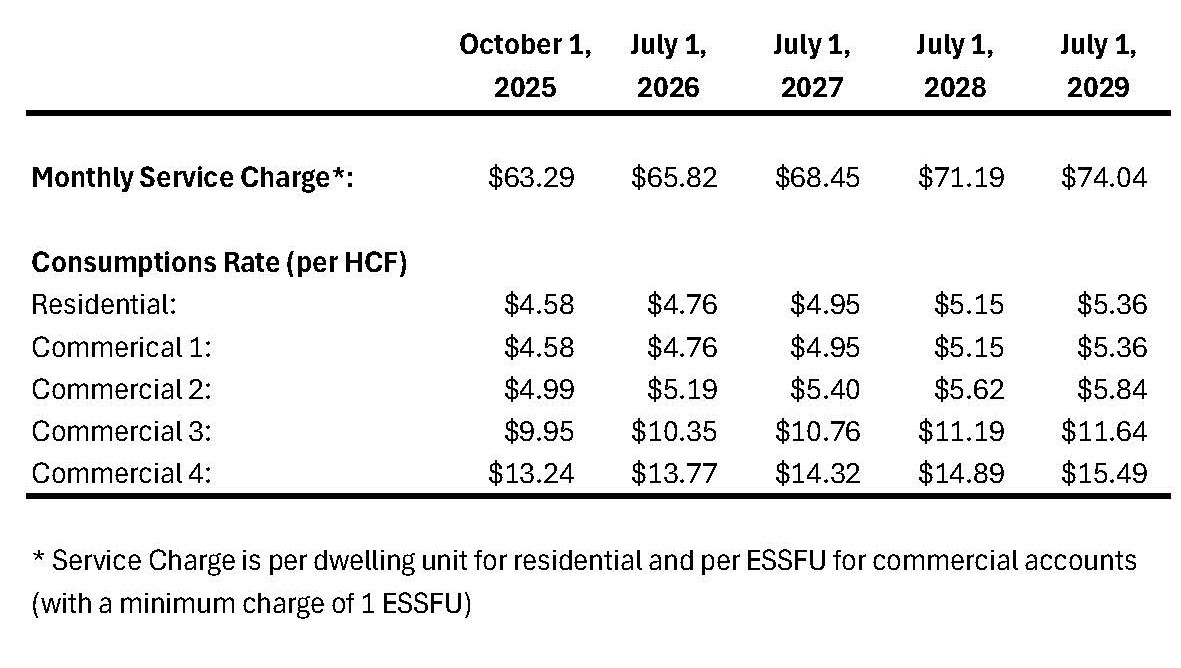
Water Rates
How to Pay Your Bill Easily

Utility Services & Billing – City of Ukiah, CA

Pay Your Bill In-Person

The City offers two ways to make your payment at the Civic Center:

  • Walk in Payments
    • You can bring your payment to the Utility Customer Service Desk at the City of Ukiah Civic Center, located at 300 Seminary Ave, Ukiah. Please bring your bill or payment coupon. The customer service representative will post your payment and provide you a receipt.
  • Drop Box Payments
    • Payments dropped in one of the two drop boxes should be placed in an envelope along with the payment stub. If you do not provide a payment stub please note the account number and or service address on your check or on your envelope so your payment can be properly posted. All payments will be picked up daily after 8 am and posted to accounts on the same day. The City offers two drop box locations:
      • 413 W Clay Street (Night Drop Box in Building Wall)
      • 300 Seminary Avenue (Green Box in Median)

Pay Your Bill Online

To make a City bill payment or register with the new online system you will need your new Mil-soft account number. Please call Customer Service at 707-463-6228 if you need assistance. 

Register Your Account

  1. Go to: https://ebiz.cityofukiah.com
  2. Click on “Register” (usually top right)
  3. When prompted:
    • Account Number: Enter 12345 (only the numbers before the dash)
    • Meter Number: Enter 1234567
    • Name on Account: Joe A. Smith
  4. Follow the prompts to complete registration, create a username and password, and set up your account.
  5. Once registered, you can log in anytime to view and pay your bill.

Make a Single Payment as a Guest

  1. Go to: https://ebiz.cityofukiah.com
  2. Click “Guest Payment”
  3. Select “Utility” from the dropdown.
  4. Enter each account number individually and completely:
    • Account Number: Enter 123456002
    • Enter Last Name: Smith
  5. Select the top row(s) for the accounts shown and click “Add to Cart”
  6. On the next screen, click “Proceed to Payment”
  7. Select your payment method in the drop down and select how much you’d like to pay (either full balance, partial, or pay ahead).
  8. Click “Continue to Payment Information”
  9. Enter your credit card or check info
  10. Click “Continue to Review Payment”, confirm all is correct, and then complete the transaction.

** All account numbers and names are fictitious and are for examples only**

Meeting and Board Information

The Calpella County Water District Board of Directors meets on the 4th Tuesday of each Month at 5:00 p.m. at 151 Laws Avenue, Ukiah, CA 95482.

Subscribe to get notified of when agendas are published.

Meeting DateAgendaPacketMinutesVideo
August 25, 2026 – CancelledCancellation Notice
July 28, 2026 – CancelledCancellation Notice
June 23, 2026 – Special MeetingAgendaPacketVideo

*To view meeting materials prior to July 2026, visit the Records page.

MemberAppointedTerm Expiration
Steve Bogart09/24/202411/2028
Tami Baarsch Bogart09/24/202411/2028
Robert Mahaffey09/01/202611/2026
VACANT
VACANT

Water Rates and Wastewater Fees
How to Pay Your Bill Easily

Utility Services & Billing – City of Ukiah, CA

Pay Your Bill In-Person

The City offers two ways to make your payment at the Civic Center:

  • Walk in Payments
    • You can bring your payment to the Utility Customer Service Desk at the City of Ukiah Civic Center, located at 300 Seminary Ave, Ukiah. Please bring your bill or payment coupon. The customer service representative will post your payment and provide you a receipt.
  • Drop Box Payments
    • Payments dropped in one of the two drop boxes should be placed in an envelope along with the payment stub. If you do not provide a payment stub please note the account number and or service address on your check or on your envelope so your payment can be properly posted. All payments will be picked up daily after 8 am and posted to accounts on the same day. The City offers two drop box locations:
      • 413 W Clay Street (Night Drop Box in Building Wall)
      • 300 Seminary Avenue (Green Box in Median)

Pay Your Bill Online

To make a City bill payment or register with the new online system you will need your new Mil-soft account number. Please call Customer Service at 707-463-6228 if you need assistance. 

Register Your Account

  1. Go to: https://ebiz.cityofukiah.com
  2. Click on “Register” (usually top right)
  3. When prompted:
    • Account Number: Enter 12345 (only the numbers before the dash)
    • Meter Number: Enter 1234567
    • Name on Account: Joe A. Smith
  4. Follow the prompts to complete registration, create a username and password, and set up your account.
  5. Once registered, you can log in anytime to view and pay your bill.

Make a Single Payment as a Guest

  1. Go to: https://ebiz.cityofukiah.com
  2. Click “Guest Payment”
  3. Select “Utility” from the dropdown.
  4. Enter each account number individually and completely:
    • Account Number: Enter 123456002
    • Enter Last Name: Smith
  5. Select the top row(s) for the accounts shown and click “Add to Cart”
  6. On the next screen, click “Proceed to Payment”
  7. Select your payment method in the drop down and select how much you’d like to pay (either full balance, partial, or pay ahead).
  8. Click “Continue to Payment Information”
  9. Enter your credit card or check info
  10. Click “Continue to Review Payment”, confirm all is correct, and then complete the transaction.

** All account numbers and names are fictitious and are for examples only**

Meeting and Board Information

The Millview County Water District Board of Directors meets on the 3rd Tuesday of each Month at 5:00 p.m. at 151 Laws Avenue, Ukiah, CA 95482.

Subscribe to get notified of when agendas are published.

Meeting DateAgendaPacketMinutesVideo
October 10, 2026
September 15, 2026 – CancelledCancellation Notice
August 18, 2026AgendaPacketVideo
July 21, 2026 – CancelledCancellation Notice

*To view meeting materials prior to July 2026, visit the Records page.

MemberAppointedTerm Expiration
Michael DeMartini09/21/202411/2028
Tim Prince09/24/202411/2028
Bryan Ross09/01/202611/2026
VACANT
VACANT

Water Rates and Connection Fees
How to Pay Your Bill Easily

Utility Services & Billing – City of Ukiah, CA

Pay Your Bill In-Person

The City offers two ways to make your payment at the Civic Center:

  • Walk in Payments
    • You can bring your payment to the Utility Customer Service Desk at the City of Ukiah Civic Center, located at 300 Seminary Ave, Ukiah. Please bring your bill or payment coupon. The customer service representative will post your payment and provide you a receipt.
  • Drop Box Payments
    • Payments dropped in one of the two drop boxes should be placed in an envelope along with the payment stub. If you do not provide a payment stub please note the account number and or service address on your check or on your envelope so your payment can be properly posted. All payments will be picked up daily after 8 am and posted to accounts on the same day. The City offers two drop box locations:
      • 413 W Clay Street (Night Drop Box in Building Wall)
      • 300 Seminary Avenue (Green Box in Median)

Pay Your Bill Online

To make a City bill payment or register with the new online system you will need your new Mil-soft account number. Please call Customer Service at 707-463-6228 if you need assistance. 

Register Your Account

  1. Go to: https://ebiz.cityofukiah.com
  2. Click on “Register” (usually top right)
  3. When prompted:
    • Account Number: Enter 12345 (only the numbers before the dash)
    • Meter Number: Enter 1234567
    • Name on Account: Joe A. Smith
  4. Follow the prompts to complete registration, create a username and password, and set up your account.
  5. Once registered, you can log in anytime to view and pay your bill.

Make a Single Payment as a Guest

  1. Go to: https://ebiz.cityofukiah.com
  2. Click “Guest Payment”
  3. Select “Utility” from the dropdown.
  4. Enter each account number individually and completely:
    • Account Number: Enter 123456002
    • Enter Last Name: Smith
  5. Select the top row(s) for the accounts shown and click “Add to Cart”
  6. On the next screen, click “Proceed to Payment”
  7. Select your payment method in the drop down and select how much you’d like to pay (either full balance, partial, or pay ahead).
  8. Click “Continue to Payment Information”
  9. Enter your credit card or check info
  10. Click “Continue to Review Payment”, confirm all is correct, and then complete the transaction.

** All account numbers and names are fictitious and are for examples only**

For information regarding the City of Ukiah Council Meetings, visit the Boards, Commissions, and Committees page.

How to Pay Your Bill Easily

Utility Services & Billing – City of Ukiah, CA

Pay Your Bill In-Person

The City offers two ways to make your payment at the Civic Center:

  • Walk in Payments
    • You can bring your payment to the Utility Customer Service Desk at the City of Ukiah Civic Center, located at 300 Seminary Ave, Ukiah. Please bring your bill or payment coupon. The customer service representative will post your payment and provide you a receipt.
  • Drop Box Payments
    • Payments dropped in one of the two drop boxes should be placed in an envelope along with the payment stub. If you do not provide a payment stub please note the account number and or service address on your check or on your envelope so your payment can be properly posted. All payments will be picked up daily after 8 am and posted to accounts on the same day. The City offers two drop box locations:
      • 413 W Clay Street (Night Drop Box in Building Wall)
      • 300 Seminary Avenue (Green Box in Median)

Pay Your Bill Online

To make a City bill payment or register with the new online system you will need your new Mil-soft account number. Please call Customer Service at 707-463-6228 if you need assistance. 

Register Your Account

  1. Go to: https://ebiz.cityofukiah.com
  2. Click on “Register” (usually top right)
  3. When prompted:
    • Account Number: Enter 12345 (only the numbers before the dash)
    • Meter Number: Enter 1234567
    • Name on Account: Joe A. Smith
  4. Follow the prompts to complete registration, create a username and password, and set up your account.
  5. Once registered, you can log in anytime to view and pay your bill.

Make a Single Payment as a Guest

  1. Go to: https://ebiz.cityofukiah.com
  2. Click “Guest Payment”
  3. Select “Utility” from the dropdown.
  4. Enter each account number individually and completely:
    • Account Number: Enter 123456002
    • Enter Last Name: Smith
  5. Select the top row(s) for the accounts shown and click “Add to Cart”
  6. On the next screen, click “Proceed to Payment”
  7. Select your payment method in the drop down and select how much you’d like to pay (either full balance, partial, or pay ahead).
  8. Click “Continue to Payment Information”
  9. Enter your credit card or check info
  10. Click “Continue to Review Payment”, confirm all is correct, and then complete the transaction.

** All account numbers and names are fictitious and are for examples only**

Fees & Shutoff Policy

Notification Process and Fees
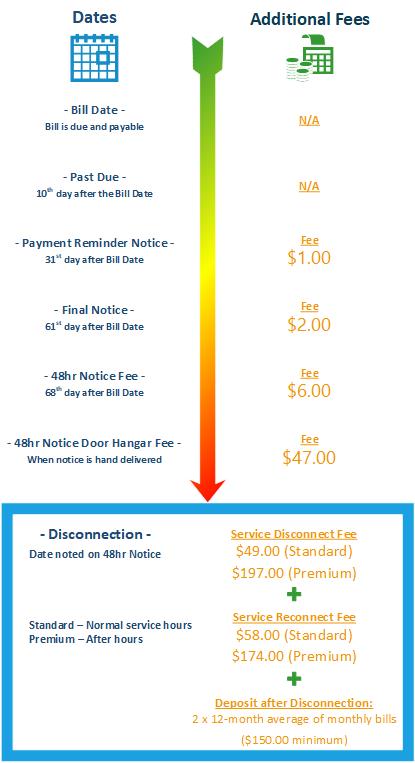
All bills are due and payable upon presentation. Your account is considered Delinquent if payment is not received by close of business on the 10th day after the Bill Date. A Payment Reminder Notice will be issued on the 31st day after the Bill Date if your account is not paid in full, and a fee will be applied. If the Delinquent Amount is not paid, a Final Notice of Possible Disconnection will be issued on the 61st day after the Bill Date, and an additional fee will be applied. If the Delinquent Amount remains unpaid, you may receive a 48 Hour Notice of Disconnection on or after the 68th day following the Bill Date, and an additional fee will be applied. If payment is not received by the date on the 48 Hour Notice, your service may be turned off and a Service Disconnect Fee will be applied.

If your service has been turned off, you will be required to pay the total outstanding balance on your account, including any current charges and all applicable fees, before service will be restored. A Reconnection Fee will be applied, and an After-Hours Reconnection Premium Fee will apply if service is restored outside regular business hours.

The Utility Shutoff Policy and the current schedule of fees are available below:

Meeting and Board Information

The Willow County Water District Board of Directors meets on the 2nd Monday of each Month at 5:00 p.m. at 151 Laws Avenue, Ukiah, CA 95482.

Subscribe to get notified of when agendas are published.

Meeting DateAgendaPacketMinutesVideo
October 12, 2026
September 14, 2026 – CancelledCancellation Notice
August 10, 2026 – CancelledCancellation Notice
July 13, 2026 – CancelledCancellation Notice

*To view meeting materials prior to July 2026, visit the Records page.

MemberAppointedTerm Expiration
Devin W. Gordon10/04/202211/2026
Michael L. Hildreth10/04/202211/2026
Ross LaRue10/04/202211/2026
Gary L. Nevill09/24/202411/2028
Devin Boer09/01/202611/2028

Water Rates and Connection Fees
How to Pay Your Bill Easily

Utility Services & Billing – City of Ukiah, CA

Pay Your Bill In-Person

The City offers two ways to make your payment at the Civic Center:

  • Walk in Payments
    • You can bring your payment to the Utility Customer Service Desk at the City of Ukiah Civic Center, located at 300 Seminary Ave, Ukiah. Please bring your bill or payment coupon. The customer service representative will post your payment and provide you a receipt.
  • Drop Box Payments
    • Payments dropped in one of the two drop boxes should be placed in an envelope along with the payment stub. If you do not provide a payment stub please note the account number and or service address on your check or on your envelope so your payment can be properly posted. All payments will be picked up daily after 8 am and posted to accounts on the same day. The City offers two drop box locations:
      • 413 W Clay Street (Night Drop Box in Building Wall)
      • 300 Seminary Avenue (Green Box in Median)

Pay Your Bill Online

To make a City bill payment or register with the new online system you will need your new Mil-soft account number. Please call Customer Service at 707-463-6228 if you need assistance. 

Register Your Account

  1. Go to: https://ebiz.cityofukiah.com
  2. Click on “Register” (usually top right)
  3. When prompted:
    • Account Number: Enter 12345 (only the numbers before the dash)
    • Meter Number: Enter 1234567
    • Name on Account: Joe A. Smith
  4. Follow the prompts to complete registration, create a username and password, and set up your account.
  5. Once registered, you can log in anytime to view and pay your bill.

Make a Single Payment as a Guest

  1. Go to: https://ebiz.cityofukiah.com
  2. Click “Guest Payment”
  3. Select “Utility” from the dropdown.
  4. Enter each account number individually and completely:
    • Account Number: Enter 123456002
    • Enter Last Name: Smith
  5. Select the top row(s) for the accounts shown and click “Add to Cart”
  6. On the next screen, click “Proceed to Payment”
  7. Select your payment method in the drop down and select how much you’d like to pay (either full balance, partial, or pay ahead).
  8. Click “Continue to Payment Information”
  9. Enter your credit card or check info
  10. Click “Continue to Review Payment”, confirm all is correct, and then complete the transaction.

** All account numbers and names are fictitious and are for examples only**

Meeting Information

Meeting DateAgendaPacketMinutesVideo

Water Utility Application
Water Rates
How to Pay Your Bill Easily

Utility Services & Billing – City of Ukiah, CA

Pay Your Bill In-Person

The City offers two ways to make your payment at the Civic Center:

  • Walk in Payments
    • You can bring your payment to the Utility Customer Service Desk at the City of Ukiah Civic Center, located at 300 Seminary Ave, Ukiah. Please bring your bill or payment coupon. The customer service representative will post your payment and provide you a receipt.
  • Drop Box Payments
    • Payments dropped in one of the two drop boxes should be placed in an envelope along with the payment stub. If you do not provide a payment stub please note the account number and or service address on your check or on your envelope so your payment can be properly posted. All payments will be picked up daily after 8 am and posted to accounts on the same day. The City offers two drop box locations:
      • 413 W Clay Street (Night Drop Box in Building Wall)
      • 300 Seminary Avenue (Green Box in Median)

Pay Your Bill Online

To make a City bill payment or register with the new online system you will need your new Mil-soft account number. Please call Customer Service at 707-463-6228 if you need assistance. 

Register Your Account

  1. Go to: https://ebiz.cityofukiah.com
  2. Click on “Register” (usually top right)
  3. When prompted:
    • Account Number: Enter 12345 (only the numbers before the dash)
    • Meter Number: Enter 1234567
    • Name on Account: Joe A. Smith
  4. Follow the prompts to complete registration, create a username and password, and set up your account.
  5. Once registered, you can log in anytime to view and pay your bill.

Make a Single Payment as a Guest

  1. Go to: https://ebiz.cityofukiah.com
  2. Click “Guest Payment”
  3. Select “Utility” from the dropdown.
  4. Enter each account number individually and completely:
    • Account Number: Enter 123456002
    • Enter Last Name: Smith
  5. Select the top row(s) for the accounts shown and click “Add to Cart”
  6. On the next screen, click “Proceed to Payment”
  7. Select your payment method in the drop down and select how much you’d like to pay (either full balance, partial, or pay ahead).
  8. Click “Continue to Payment Information”
  9. Enter your credit card or check info
  10. Click “Continue to Review Payment”, confirm all is correct, and then complete the transaction.

** All account numbers and names are fictitious and are for examples only**

Meeting and Board Information

The Hopland Public Utility District Board of Directors meets on the 3rd Monday of each Month at 6:00 p.m. at Brutocao Cellars located at 13500 S. Hwy 101 Hopland, CA 95449.

Meeting DateAgendaPacketMinutesVideo
October 19, 2026
September 21, 2026AgendaPacketVideo
August 17, 2026AgendaPacketVideo
July 20, 2026 – CancelledCancellation Notice

MemberAppointedTerm Expiration
Joan Norry
Carol Gunter-Hall
Gary Rosetti
Shaun Falleri
VACANT

Water Rates and Wastewater Fees

Rates:

Water Rate Schedule

Water – $2.66 per thousand gallons

Monthly Service per Meter Size

  • 3/4″ Meter – $21.00
  • 1″ Meter – $39.20
  • 1.5″ Meter – $77.00
  • 2″ Meter – $121.80
  • 3″ Meter – $238.00
  • 4″ Meter – $371.00
  • 6″ Meter – $763.00

Sewer – $75.00 per REU (per residential equivalent unit)

Deposits

  • Residential – $100.00 + $5.00 service charge
  • Commercial – Twice the monthly base charge
  • Disconnection Processing Fee: $55.00
  • Reconnection Fee: $25.00 (during normal business hours) -OR- $75.00 (after 5:00 p.m.)

Connection Fee (New Service)*

Water

  • 1″ Service – $5,000.00
  • 1.5″ Service – $6,750.00
  • 2″ Service – $10,000.00

*Larger than 2″ Service – at the discretion of the Board

Sewer – $6,866.00 per REU

*Plus time and materials

How to Pay Your Bill Easily

Utility Services & Billing – City of Ukiah, CA

Pay Your Bill In-Person

The City offers two ways to make your payment at the Civic Center:

  • Walk in Payments
    • You can bring your payment to the Utility Customer Service Desk at the City of Ukiah Civic Center, located at 300 Seminary Ave, Ukiah. Please bring your bill or payment coupon. The customer service representative will post your payment and provide you a receipt.
  • Drop Box Payments
    • Payments dropped in one of the two drop boxes should be placed in an envelope along with the payment stub. If you do not provide a payment stub please note the account number and or service address on your check or on your envelope so your payment can be properly posted. All payments will be picked up daily after 8 am and posted to accounts on the same day. The City offers two drop box locations:
      • 413 W Clay Street (Night Drop Box in Building Wall)
      • 300 Seminary Avenue (Green Box in Median)

Pay Your Bill Online

To make a City bill payment or register with the new online system you will need your new Mil-soft account number. Please call Customer Service at 707-463-6228 if you need assistance. 

Register Your Account

  1. Go to: https://ebiz.cityofukiah.com
  2. Click on “Register” (usually top right)
  3. When prompted:
    • Account Number: Enter 12345 (only the numbers before the dash)
    • Meter Number: Enter 1234567
    • Name on Account: Joe A. Smith
  4. Follow the prompts to complete registration, create a username and password, and set up your account.
  5. Once registered, you can log in anytime to view and pay your bill.

Make a Single Payment as a Guest

  1. Go to: https://ebiz.cityofukiah.com
  2. Click “Guest Payment”
  3. Select “Utility” from the dropdown.
  4. Enter each account number individually and completely:
    • Account Number: Enter 123456002
    • Enter Last Name: Smith
  5. Select the top row(s) for the accounts shown and click “Add to Cart”
  6. On the next screen, click “Proceed to Payment”
  7. Select your payment method in the drop down and select how much you’d like to pay (either full balance, partial, or pay ahead).
  8. Click “Continue to Payment Information”
  9. Enter your credit card or check info
  10. Click “Continue to Review Payment”, confirm all is correct, and then complete the transaction.

** All account numbers and names are fictitious and are for examples only**

Upper Russian River Water Agency (URRWA)

Upper Russian River Water Agency (URRWA) is a Joint Powers Authority (JPA) working for the consolidation of Ukiah Valley’s water. The board includes a single member from Willow County Water, Calpella County Water, Redwood Valley County Water, Millview County Water, and most recently the Ukiah Valley Sanitation District.

Close Search Window
↑